iOS 27 beta 4 lets you enable Automatic Downloads on Apple TV (app)
The feature will make sure the next episodes of your favorite TV shows are downloaded
 Written by Daniel Morrisey on Tuesday, July 21, 2026
This feature is for the Apple TV app on your iPhone not the Apple TV device it’s self.
Spotted by Aaron Perris on X the new “Automatic Downloads” feature can be found in the TV section of the settings app on iOS 27 Beta 4.
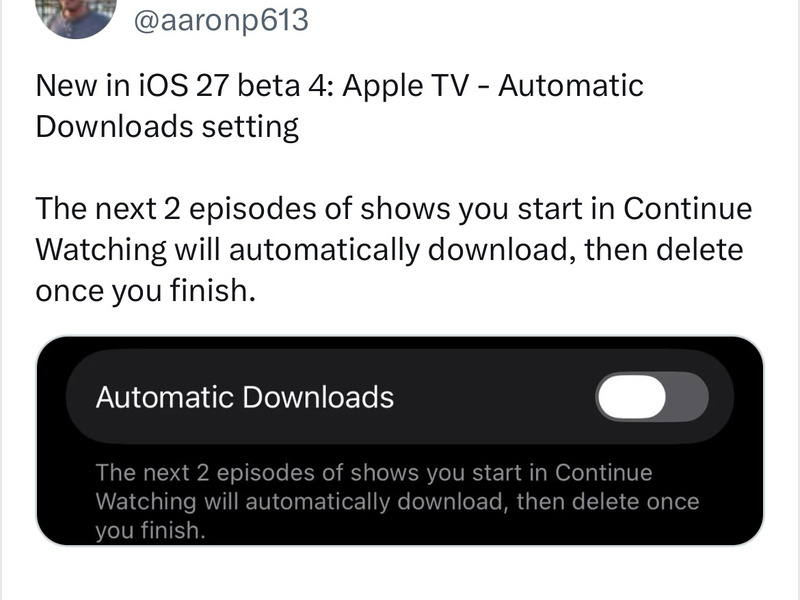
Here’s how it works:
The “Automatic Downloads” feature will download the next 2 episodes of shows you start in “Continue Watching” will automatically download then automatically delete when you finish watching them.
How to enable it:
To enable Automatic Downloads on your iPhone (iOS 27 Developer Beta 4).
- Open the “Settings app”
- Scroll down to the “apps” section
- look for the “TV” app
- Toggle “Automatic Downloads”
Quick note: this feature will download shows to your iPhone’s storage, make sure you have enough space for downloads.
If you notice anything new in iOS 27 beta 4 inform us!
Signal: danielmorrisey.6754
Email: tips@danielmorrisey.com